


Description
Download Cigati iCloud Email Backup Tool – Free Secure Email Backup for Windows
Overview & Core Features
Cigati iCloud Email Backup Tool is a lightweight, free Windows application designed by Cigati Solutions to give iCloud users a reliable way to export and preserve their email archives. In an age where data loss can happen with a single accidental deletion or a corrupted cloud sync, having a local copy of important correspondence is essential for both personal and professional users. The tool focuses on simplicity: after a quick sign‑in with your Apple ID, the software scans every mailbox in your iCloud account, presents a clear folder structure, and lets you download messages as .eml files or bundle them into a single .pst file for Outlook compatibility. All of this is done without the need for a paid subscription, making it an attractive option for anyone who wants a “set‑and‑forget” backup solution.
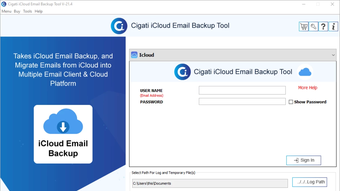
The interface follows a familiar Windows wizard pattern, which reduces the learning curve for users of any technical level. A progress bar gives real‑time feedback, and the application writes a detailed log file so you can verify that every message has been captured. Because the software runs locally, your credentials are never stored on third‑party servers, adding an extra layer of security. The backup process can be scheduled to run nightly, weekly, or on demand, ensuring that new emails are captured as soon as they arrive in iCloud. Moreover, the tool supports incremental backups, meaning only new or changed messages are transferred after the first full backup—saving both bandwidth and storage space.
- Free, no‑hidden fees or trial limitations.
- One‑click authentication with Apple ID (OAuth 2.0).
- Export options: individual .eml files, bulk .pst, or .mbox.
- Incremental backup to avoid duplicate downloads.
- Customizable schedule (daily, weekly, monthly).
- Detailed log file for audit and troubleshooting.
- Supports all iCloud mail folders, including custom labels.
- Lightweight installer under 20 MB, minimal system impact.
Installation, Usage & System Compatibility
Getting started with Cigati iCloud Email Backup Tool is intentionally straightforward. Download the installer from the official Cigati Solutions website—make sure you choose the Windows version. The installer is signed with a valid code‑signing certificate, which Windows Defender recognizes as safe, so you won’t face any scary “unknown publisher” warnings. Run the .exe file, accept the license agreement, and follow the on‑screen prompts. The entire installation typically completes in under two minutes on a modern PC.
Once installed, launch the application from the Start menu. The first screen asks you to sign in with your iCloud credentials. The tool uses Apple’s OAuth 2.0 flow, opening a secure browser window where you can enter your Apple ID and, if you have two‑factor authentication enabled, approve the sign‑in on your trusted device. After successful authentication, the program fetches a list of all mailboxes—Inbox, Sent, Drafts, and any user‑created folders.
To begin a backup, simply select the folders you want to export, choose a destination folder on your PC, and click “Start Backup.” A progress bar shows the number of messages processed, and an estimated time‑remaining counter updates dynamically. For users who need regular backups, the “Schedule” tab lets you define a cron‑like schedule—e.g., every night at 02:00 AM. The software runs in the background, using a low‑priority thread so it does not interfere with other tasks. All backups are saved in the format you selected during the initial setup; you can later import a .pst file directly into Microsoft Outlook or open .eml files with any standard mail client.
System Compatibility: The tool is built for 64‑bit Windows operating systems, including Windows 7, 8, 10, and 11. Minimum hardware requirements are modest: a 1 GHz processor, 512 MB RAM, and 100 MB of free disk space for the application itself plus additional space for the backup files.
Pros, Cons & Frequently Asked Questions
Pros
- Completely free with no hidden premium tiers.
- Secure OAuth authentication ensures credentials are never stored.
- Multiple export formats accommodate different email clients.
- Incremental backup saves time and bandwidth after the first run.
- Low system footprint; runs silently in the background.
- Detailed logs help verify backup integrity.
Cons
- Only available for Windows; no native macOS or Linux version.
- No built‑in cloud storage; backups are stored locally.
- Interface, while functional, looks dated compared to modern apps.
- Limited support options—reliant on community forums and email.
FAQ – Your Common Questions Answered
Is the Cigati iCloud Email Backup Tool truly free?
Yes. The application is offered at no cost and does not include any hidden fees, trial periods, or mandatory upgrades. All features—including scheduled and incremental backups—are available in the free version.
Can I use the tool to backup attachments as well?
Absolutely. When you export messages, attachments are saved together with the email in the chosen format. For .pst and .mbox exports, attachments remain embedded, while .eml files store them as separate files in the same folder.
What happens if I change my iCloud password?
The next time the scheduled backup runs, the tool will detect an authentication error and prompt you to re‑enter your Apple ID credentials. Because it uses OAuth, you won’t need to store the new password inside the application.
Is there a limit to how many emails I can backup?
No artificial limit exists. The only constraints are the storage capacity on your local drive and the bandwidth available during the initial full backup. Incremental backups keep subsequent runs lightweight.
Can I restore emails back to iCloud from a backup?
The tool is primarily a one‑way exporter. To restore, you would need to import the .pst or .mbox files into a mail client (like Outlook or Apple Mail) and then use that client’s “upload” feature to push the messages back to iCloud.
Overall Review: Cigati iCloud Email Backup Tool delivers on its promise of a free, secure, and easy‑to‑use backup solution for Windows users. While the UI could use a modern facelift and native macOS support would be welcome, the core functionality is solid, making it a recommendable choice for anyone who values a local copy of their iCloud correspondence.
Conclusion & Call to Action
In a digital landscape where email remains a primary communication channel, protecting that data should be a top priority. Cigati iCloud Email Backup Tool offers a no‑cost, secure, and user‑friendly way to safeguard every message stored in your iCloud account. Its support for multiple export formats, incremental backups, and scheduled runs ensures that you can maintain a comprehensive archive without constantly monitoring the process. Even though the application is Windows‑only and lacks a polished modern UI, its reliability and transparent pricing outweigh those minor drawbacks.
If you’re ready to secure your iCloud emails with a trusted backup solution, click the button below to download the latest version directly from the official site. Remember to run the installer with administrator rights to ensure smooth operation, and set up a nightly schedule to keep your archive up to date automatically. Protect your inbox today—your future self will thank you.
Guides & Tutorials for Cigati iCloud Email Backup Tool
How to install Cigati iCloud Email Backup Tool
- Click the Preview / Download button above.
- Once redirected, accept the terms and click Install.
- Wait for the Cigati iCloud Email Backup Tool download to finish on your device.
How to use Cigati iCloud Email Backup Tool
This software is primarily used for its core features described above. Open the app after installation to explore its capabilities.
User Reviews for Cigati iCloud Email Backup Tool 0
No reviews found





